Organize your downloads with full control.
FilesGoThere is a lightweight Windows utility that watches folders in real time and helps move files with customizable rules, clear review tools, and zero cloud dependency.

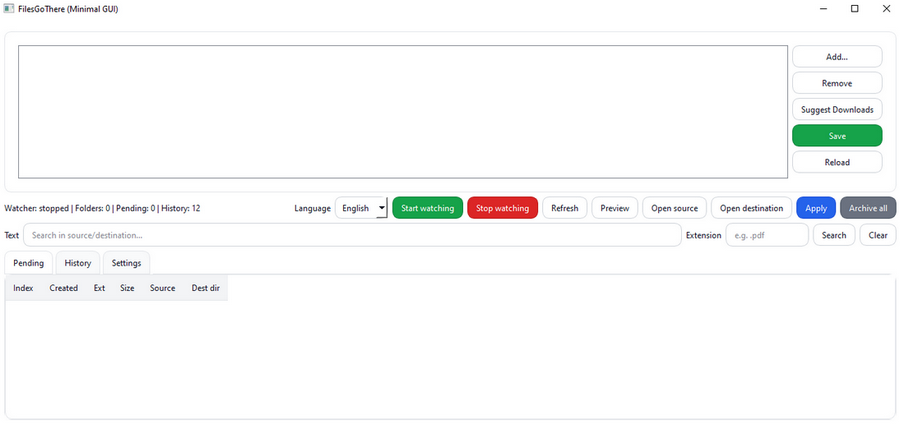
Smart file organization with full user control
FilesGoThere monitors folders in real time and helps you organize files with a local-first workflow, safe automation, and clear manual review when you want it.
Real-time multi-folder monitoring
Watch one or more folders continuously with completed-download detection.
Offline and privacy-friendly
No cloud, no telemetry, no online dependency. Everything stays on your PC.
Custom rule engine
Extension-based rules, configurable destination folders, and fallback categories.
Download safety
Ignores temporary files and waits for completion before proposing or moving actions.
Polished desktop GUI
Review pending actions, manage folders, use history and undo, and switch language (IT/EN).
Manual and automatic workflow
Use a safe queue-based flow or let automatic mode move completed downloads for you.
Stable, local, and ready for daily use
FilesGoThere 1.0.0 is the first stable public release, focused on safe automation and a simple Windows experience.
Core features
- Real-time multi-folder monitoring
- Duplicate handling: rename / skip / overwrite
- Queue-based proposed actions
- History and Undo support
- Tray support and focus options
- Manual and auto modes
Distribution
- Windows installer for end users
- Portable ZIP package
- No Python required for normal use
- Windows 10 / 11
- Local data stored in %LOCALAPPDATA%
- Offline, local-first architecture
Roadmap
- Visual rule editor in the GUI
- More advanced settings and presets
- Richer filters, actions, and queue tools
- Better notifications and tray workflow
- Signed installer and smoother Windows onboarding
- Future Linux evaluation
Download FilesGoThere 1.0.0
Get the installer or the portable ZIP, read the docs, and follow future updates on GitHub.